> ## Documentation Index
> Fetch the complete documentation index at: https://docs.nofire.ai/llms.txt
> Use this file to discover all available pages before exploring further.
# Change Management
> See what changed in your infrastructure and code, and when it happened
Whether you're debugging an incident, verifying a deployment, or building a postmortem, the first question is always: what changed? NOFire correlates infrastructure events and code changes into a single timeline so you don't have to piece it together manually.
Ask about pod restarts, deployments, and scaling across your entire cluster
Get a unified view of infrastructure + code changes for a specific service
## What NOFire Tracks
**Infrastructure changes:**
* Deployment rollouts and rollbacks
* Autoscaling events (scale up / scale down)
* Pod restarts and lifecycle events
* Configuration updates (ConfigMaps, Secrets, feature flags)
* Node and host-level maintenance events
* Cloud resource changes (load balancers, DNS, security groups)
* Namespace and environment-wide changes
**Code changes (from VCS webhooks):**
* Recent commits and merged PRs
* Deployment-correlated code changes
* File-level change history
## How to Use It
Tag `@NOFire AI` in Slack and ask in plain language. NOFire figures out what you need. No query syntax required.
### Cluster-Wide Queries
Use when you want to see what happened across the entire cluster, without focusing on a specific service.
```
@NOFire AI what pods restarted in the otel-demo cluster in the last hour?
```
```
@NOFire AI show me all deployments in the otel-demo cluster today
```
```
@NOFire AI what scaling events happened in the otel-demo cluster in the last 24 hours?
```
```
@NOFire AI show me all changes in the otel-demo cluster in the last 24 hours
```
### Entity-Specific Timeline
Use when you're investigating a specific service, deployment, or pod. @-mention the service to get faster, more precise results.
```
@NOFire AI show me all changes for @checkout in the last 2 hours
```
```
@NOFire AI what changed in @cart in the last 6 hours?
```
```
@NOFire AI show me infrastructure and code changes for @payment in the last 4 hours
```
### Combined Queries
NOFire can correlate infrastructure and code changes together. Be specific about what signals you want and over what time window.
```
@NOFire AI show me pod changes and recent deployments for @frontend in the last hour
```
```
@NOFire AI what code changes correlate with @recommendation restarts in the last hour?
```
## Understanding the Output
NOFire returns a timeline with `Time` and `Event` columns, ordered chronologically:
```
Change timeline for: otel-demo cluster (last 24 hours)
47 changes across 18 entities
Time Event
─────────────────────────────────────────────────────
2026-02-17 14:32:11 checkout: deployment rolled out (v2.1.4 → v2.1.5)
2026-02-17 14:28:45 cart: 3 pods restarted (OOMKilled)
2026-02-17 14:15:02 payment: autoscaled 2 → 5 pods (CPU 87%)
2026-02-17 13:55:18 product-catalog: config update (feature flag changed)
2026-02-17 13:40:00 frontend-proxy: deployment rolled out (nginx config)
2026-02-17 13:22:34 kafka: replication factor updated
```
## Common Scenarios
Start broad, then narrow down.
```
@NOFire AI what changed in the last hour across all services?
```
Then follow up on anything suspicious:
```
@NOFire AI show me the deployment timeline for @checkout in the last 2 hours
```
```
@NOFire AI show me all infrastructure and code changes for the cart service before 14:30 today
```
NOFire returns a unified timeline combining infrastructure events (restarts, scaling, config updates) and recent commits/PRs in the same window.
```
@NOFire AI show me pod changes, scaling events, and recent deployments for the payment service in the last 3 hours
```
Useful when traces show latency but you need to understand what infrastructure or code change preceded it.
```
@NOFire AI show me changes in the otel-demo namespace in the last 7 days
```
Understand deployment frequency and stability before releasing a new version of the recommendation or fraud-detection service.
```
@NOFire AI show me all changes between Feb 16 18:00 and Feb 17 08:00 in the otel-demo cluster
```
Use this to populate your postmortem timeline without manual log digging across infrastructure events and Git history.
```
@NOFire AI understand seasonality patterns of the otel-demo cluster from December 2025 to February 2026
```
NOFire analyzes deployment cycles, scaling windows, maintenance patterns, and peak activity periods to help plan releases and on-call coverage.
## Seasonality Analysis
For longer time windows, NOFire goes beyond a change timeline and analyzes **patterns**: when your team deploys, when your infrastructure scales, and when the riskiest change windows are.
```
@NOFire AI understand seasonality patterns of this cluster from December 2025 till February 16th 2026
```
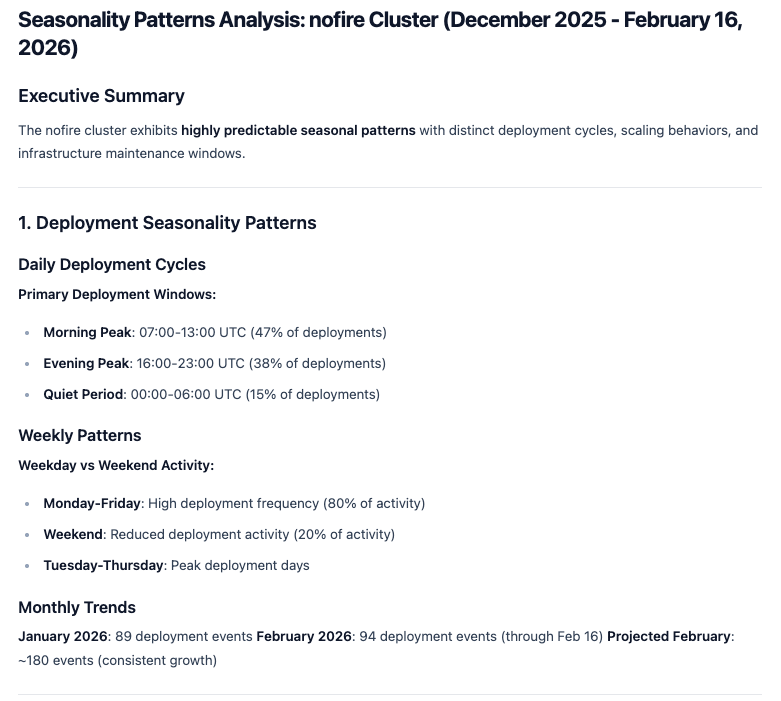
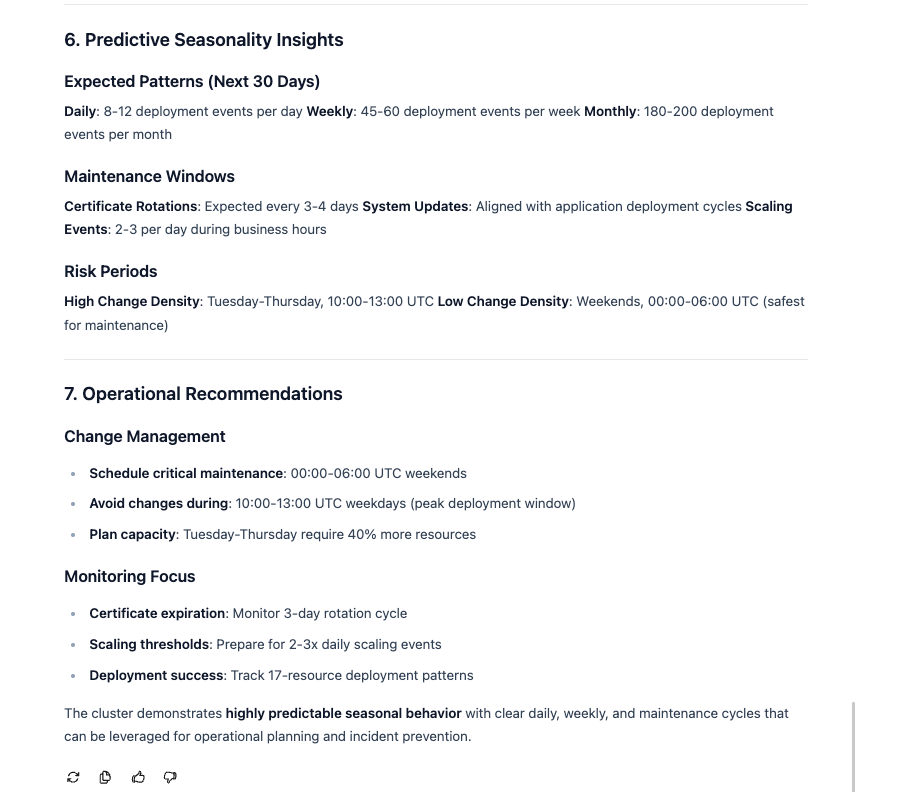
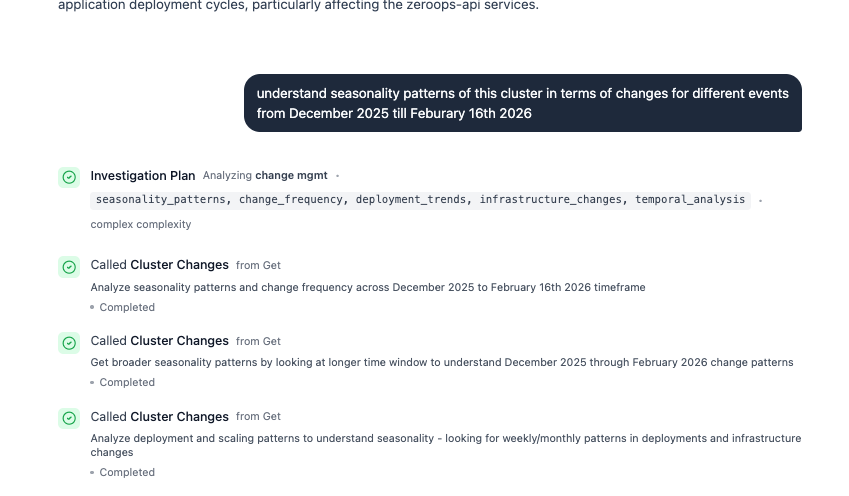 NOFire identifies daily deployment cycles, weekly activity patterns, and monthly trends, then surfaces actionable recommendations for scheduling changes and on-call coverage.
 ### What the analysis covers
* **Daily deployment cycles**: peak deployment windows and quiet periods
* **Weekly patterns**: high-activity weekdays vs. low-activity weekends
* **Monthly trends**: deployment volume growth and trajectory
* **Maintenance windows**: certificate rotations, system updates, scaling event frequency
* **Risk periods**: highest and lowest change density windows
* **Operational recommendations**: when to schedule critical maintenance, when to avoid changes, and where to increase capacity
This is useful for capacity planning, on-call scheduling, and setting deployment policies based on actual historical behavior rather than assumptions.
## Time Windows
By default, NOFire looks back 24 hours. You can specify any window in your query:
* `in the last hour`
* `in the last 6 hours`
* `today`
* `yesterday`
* `in the last 7 days`
* `between Feb 16 and Feb 17`
For patterns and seasonality analysis, longer windows (30-90 days) surface deployment cycles, scaling behavior, and maintenance windows.
## Next Steps
Start collecting Kubernetes change events
Correlate code changes with infrastructure events
### What the analysis covers
* **Daily deployment cycles**: peak deployment windows and quiet periods
* **Weekly patterns**: high-activity weekdays vs. low-activity weekends
* **Monthly trends**: deployment volume growth and trajectory
* **Maintenance windows**: certificate rotations, system updates, scaling event frequency
* **Risk periods**: highest and lowest change density windows
* **Operational recommendations**: when to schedule critical maintenance, when to avoid changes, and where to increase capacity
This is useful for capacity planning, on-call scheduling, and setting deployment policies based on actual historical behavior rather than assumptions.
## Time Windows
By default, NOFire looks back 24 hours. You can specify any window in your query:
* `in the last hour`
* `in the last 6 hours`
* `today`
* `yesterday`
* `in the last 7 days`
* `between Feb 16 and Feb 17`
For patterns and seasonality analysis, longer windows (30-90 days) surface deployment cycles, scaling behavior, and maintenance windows.
## Next Steps
Start collecting Kubernetes change events
Correlate code changes with infrastructure events