> ## Documentation Index
> Fetch the complete documentation index at: https://docs.nofire.ai/llms.txt
> Use this file to discover all available pages before exploring further.
# Deployment Risk
> Know the risk before you deploy. Prevent incidents before they happen.
## Overview
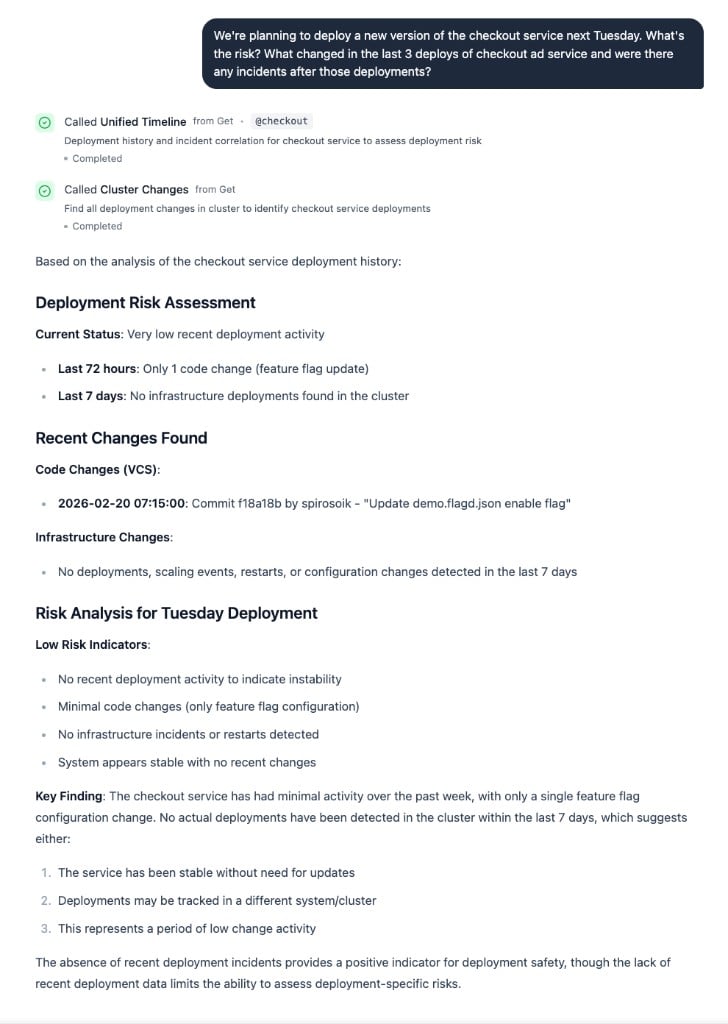
Before you deploy, NOFire AI tells you which services are affected, what the risk level is, and how to deploy safely — based on your actual infrastructure and live service dependencies.
**Powered by:** [NOFire AI Edge](/edge/introduction) builds a causal graph of your infrastructure. NOFire AI uses this graph to assess deployment impact and risk based on live service dependencies and historical patterns.
## What You Get
See which production services your code changes touch. See the blast radius before you merge.
Clear risk assessment: **Low**, **Medium**, or **High**. Know if you can deploy now or need extra precautions.
Specific guidance: standard deploy, canary rollout, or staged deployment with team present.
One service change or cascade to critical business functions? See the downstream impact before it reaches production.
Warnings if a service had recent incidents or rollbacks. Don't repeat last week's mistakes.
Check risk while coding in Cursor or Claude Desktop. No context switching required.
## Real-World Impact
* Friday afternoon deploy
* Payments fail 10 min later
* 15 services cascading failure
* 2 hours incident response
* Revenue impact + angry customers
* HIGH RISK warning before merge
* Recent instability alert shown
* Deploy rescheduled to Tuesday
* Canary rollout catches issue
* Zero production impact
* Deploy everything at once
* Auth breaks entire platform
* All users can't log in
* 4-hour outage
* Warning: high-risk auth changes
* Recommendation: staged deployment
* Issue caught in first stage
* Fixed before critical services
* Zero customer impact
* Code review looks good
* Login breaks for thousands
* Emergency rollback
* Incident response mode
* Ask in IDE: "What's the risk?"
* HIGH RISK: auth affects all users
* Extra testing + staging first
* Canary catches edge case
* Quick fix, smooth rollout
## How to Use It
Check risk while coding in Cursor or Claude Desktop. Ask: "What's the deployment risk?"
Ask `@NOFire AI` about deployment risk and get team-wide visibility during reviews.
Review risks and dependencies at [my.nofire.ai](https://my.nofire.ai) before deploying.
 ## Best Practices
Add NOFire AI to your `AGENTS.md` so AI coding agents automatically check risk:
```markdown theme={null}
# AGENTS.md - Deployment Risk Assessment
## Before merging changes
Always check deployment risk with NOFire AI:
1. Run tests: `npm test` or `pytest`
2. Ask: "What's the deployment risk for these changes?"
3. Follow the recommended deployment strategy:
- HIGH RISK: staging first, then canary (5% → 25% → 100%)
- MEDIUM RISK: canary deployment (10% → 50% → 100%)
- LOW RISK: standard deployment
## Deployment guidelines
- Never deploy high-risk changes on Fridays or before holidays
- Deploy high-risk changes during business hours with team available
- Monitor for 15+ minutes between canary stages
```
[See complete MCP integration guide →](/mcp/getting-started)
**Check before every merge** - Takes 10 seconds, prevents hours of incident response
**Respect high-risk warnings** - Use staging and canary deployments as recommended
**Deploy at the right time** - High-risk changes need your team available, not Friday 5pm
**Share the results** - Post risk assessments in PRs so the team learns patterns
**Document critical services** - Mark services that need extra care in your architecture docs
**Review deployment outcomes** - Did a deployment go wrong? Share what NOFire AI predicted vs what happened
**Build team knowledge** - Regular use builds intuition about your system's risk profile
**Integrate with CI/CD** - Consider blocking merges for high-risk changes without explicit approval
## Production Readiness Reviews
Before a major launch or migration, ask NOFire to create a production readiness review. It pulls deployment risk, service dependencies, recent incidents, and current health into a structured ticket — so your team has a single artifact to review.
```
@NOFire AI create a production readiness review for the payment service migration
```
```
@NOFire AI is the checkout service ready for the Black Friday traffic increase? Check dependencies, recent incidents, and current health.
```
NOFire compiles the review from your Production Context Graph and posts it to [Linear](/knowledge/linear) or [Atlassian](/knowledge/atlassian) if connected.
## Getting Started
Deploy the Kubernetes agent that builds your causal graph. This is required for deployment risk assessment.
[Install NOFire AI Edge →](/edge/installation)
Set up MCP integration to query NOFire AI from Cursor, Claude Desktop, or other MCP-compatible tools.
[Set up MCP integration →](/mcp/getting-started)
Make a code change, then ask: "What's the deployment risk for these changes?"
Review the risk score, affected services, and deployment strategy recommendation.
Set up IDE integration to check deployment risk while you code
Generate and manage MCP API tokens
Learn how NOFire maps your service dependencies
Understand our security model
## Good to Know
NOFire AI learns your environment immediately after NOFire AI Edge connects. Risk assessments get more accurate as it observes deployment patterns and service interactions.
Brand new services get conservative risk assessments based on their architecture and dependencies. Accuracy improves after observing a few deployments.
NOFire AI analyzes your monitored infrastructure and causal graph. It doesn't cover external service failures, third-party API issues, or manual operational mistakes outside your cluster.
The causal graph and risk models learn continuously. More usage means more accurate risk assessments for your specific environment.
## Best Practices
Add NOFire AI to your `AGENTS.md` so AI coding agents automatically check risk:
```markdown theme={null}
# AGENTS.md - Deployment Risk Assessment
## Before merging changes
Always check deployment risk with NOFire AI:
1. Run tests: `npm test` or `pytest`
2. Ask: "What's the deployment risk for these changes?"
3. Follow the recommended deployment strategy:
- HIGH RISK: staging first, then canary (5% → 25% → 100%)
- MEDIUM RISK: canary deployment (10% → 50% → 100%)
- LOW RISK: standard deployment
## Deployment guidelines
- Never deploy high-risk changes on Fridays or before holidays
- Deploy high-risk changes during business hours with team available
- Monitor for 15+ minutes between canary stages
```
[See complete MCP integration guide →](/mcp/getting-started)
**Check before every merge** - Takes 10 seconds, prevents hours of incident response
**Respect high-risk warnings** - Use staging and canary deployments as recommended
**Deploy at the right time** - High-risk changes need your team available, not Friday 5pm
**Share the results** - Post risk assessments in PRs so the team learns patterns
**Document critical services** - Mark services that need extra care in your architecture docs
**Review deployment outcomes** - Did a deployment go wrong? Share what NOFire AI predicted vs what happened
**Build team knowledge** - Regular use builds intuition about your system's risk profile
**Integrate with CI/CD** - Consider blocking merges for high-risk changes without explicit approval
## Production Readiness Reviews
Before a major launch or migration, ask NOFire to create a production readiness review. It pulls deployment risk, service dependencies, recent incidents, and current health into a structured ticket — so your team has a single artifact to review.
```
@NOFire AI create a production readiness review for the payment service migration
```
```
@NOFire AI is the checkout service ready for the Black Friday traffic increase? Check dependencies, recent incidents, and current health.
```
NOFire compiles the review from your Production Context Graph and posts it to [Linear](/knowledge/linear) or [Atlassian](/knowledge/atlassian) if connected.
## Getting Started
Deploy the Kubernetes agent that builds your causal graph. This is required for deployment risk assessment.
[Install NOFire AI Edge →](/edge/installation)
Set up MCP integration to query NOFire AI from Cursor, Claude Desktop, or other MCP-compatible tools.
[Set up MCP integration →](/mcp/getting-started)
Make a code change, then ask: "What's the deployment risk for these changes?"
Review the risk score, affected services, and deployment strategy recommendation.
Set up IDE integration to check deployment risk while you code
Generate and manage MCP API tokens
Learn how NOFire maps your service dependencies
Understand our security model
## Good to Know
NOFire AI learns your environment immediately after NOFire AI Edge connects. Risk assessments get more accurate as it observes deployment patterns and service interactions.
Brand new services get conservative risk assessments based on their architecture and dependencies. Accuracy improves after observing a few deployments.
NOFire AI analyzes your monitored infrastructure and causal graph. It doesn't cover external service failures, third-party API issues, or manual operational mistakes outside your cluster.
The causal graph and risk models learn continuously. More usage means more accurate risk assessments for your specific environment.