> ## Documentation Index
> Fetch the complete documentation index at: https://docs.nofire.ai/llms.txt
> Use this file to discover all available pages before exploring further.
# Alerts
> When an alert fires, understand it immediately. Between incidents, clean up your alert rules.
NOFire AI handles alerts in two ways: **triage** when something fires, and **audit** when you want to improve your alert configuration.
## Alert Triage
When an alert fires, the first question is always: is this real, and what's causing it? NOFire pulls context from your metrics, logs, and recent changes, then tells you what's happening.
### Automatic (Slack)
When NOFire AI is in your alert channel, it picks up incoming alerts and posts an explanation in-thread. No commands needed.
NOFire runs a full investigation automatically: it checks the evidence, tests hypotheses, and posts findings with a confidence score. For the full investigation output, see [Root Cause Analysis](/skills/root-cause-analysis).
### On-demand
Ask about a specific alert in Slack, the Chat dashboard, or your IDE:
```
@NOFire AI what's causing the high error rate alert on checkout?
```
```
@NOFire AI is the memory alert on cart real or a transient spike?
```
```
@NOFire AI we have 12 alerts firing — are these related?
```
```
@NOFire AI explain the PodCrashLoopBackOff on payment
```
### What gets checked
For each alert, NOFire looks at:
* **Metrics**: what the signal looks like before and after the threshold was crossed
* **Recent changes**: deployments, config updates, or pod restarts near the alert time
* **Related signals**: other services or metrics that changed at the same time
* **History**: has this alert fired before? Is it a known pattern?
* **Downstream impact**: which other services are affected
### Alert types
CrashLoopBackOff, OOMKilled, PodNotReady, high restart counts. NOFire checks logs, resource usage, and recent config changes.
P99 latency breaches, SLO burn rate alerts. NOFire finds the slow path and the bottleneck service.
5xx spikes, high error rates. NOFire pulls error logs, checks recent deploys, and identifies the source.
CPU throttling, memory pressure, disk pressure. NOFire identifies which pods are responsible and whether a recent change caused the increase.
Node NotReady, etcd issues, network errors. NOFire checks cluster-level events and other affected workloads.
***
## Alert Audit & Fix
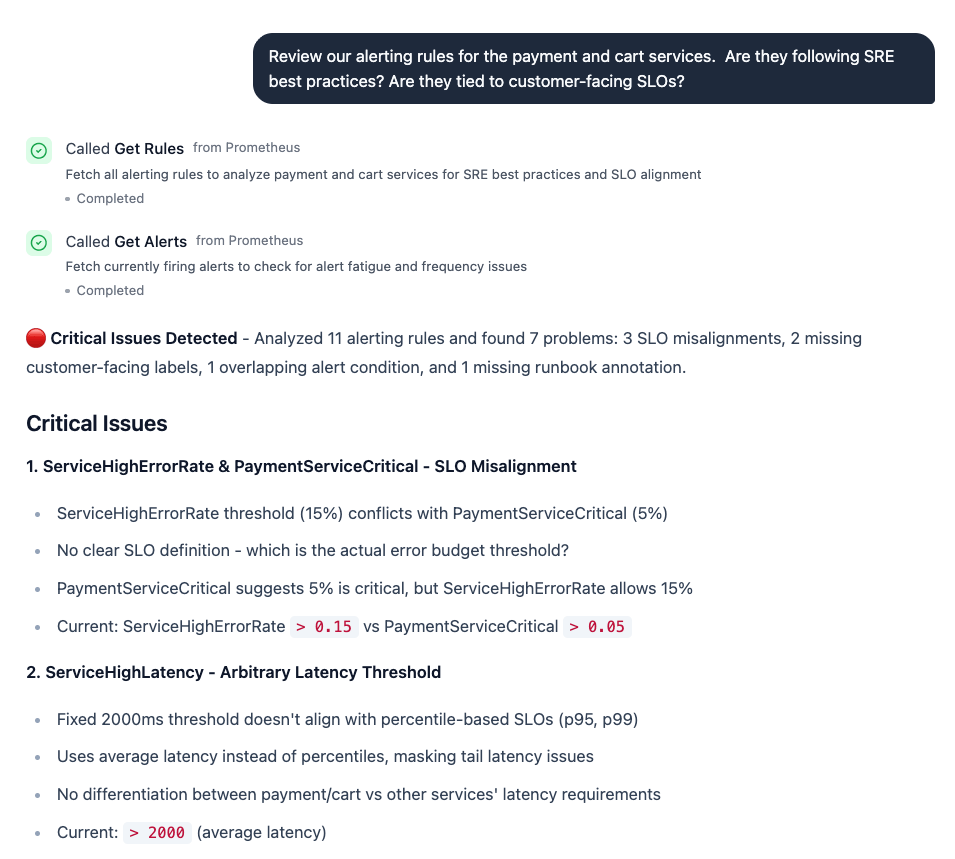
Between incidents, NOFire can review your alert rules and tell you what needs fixing: noisy alerts, missing coverage, stale thresholds, SLO misalignment.
 ### How to use it
```
@NOFire AI review our alerting rules — what's noisy and what's missing?
```
```
@NOFire AI which alerts have fired the most this month and are they useful?
```
```
@NOFire AI are there services with no alerts configured?
```
```
@NOFire AI suggest better thresholds for our latency alerts based on actual traffic
```
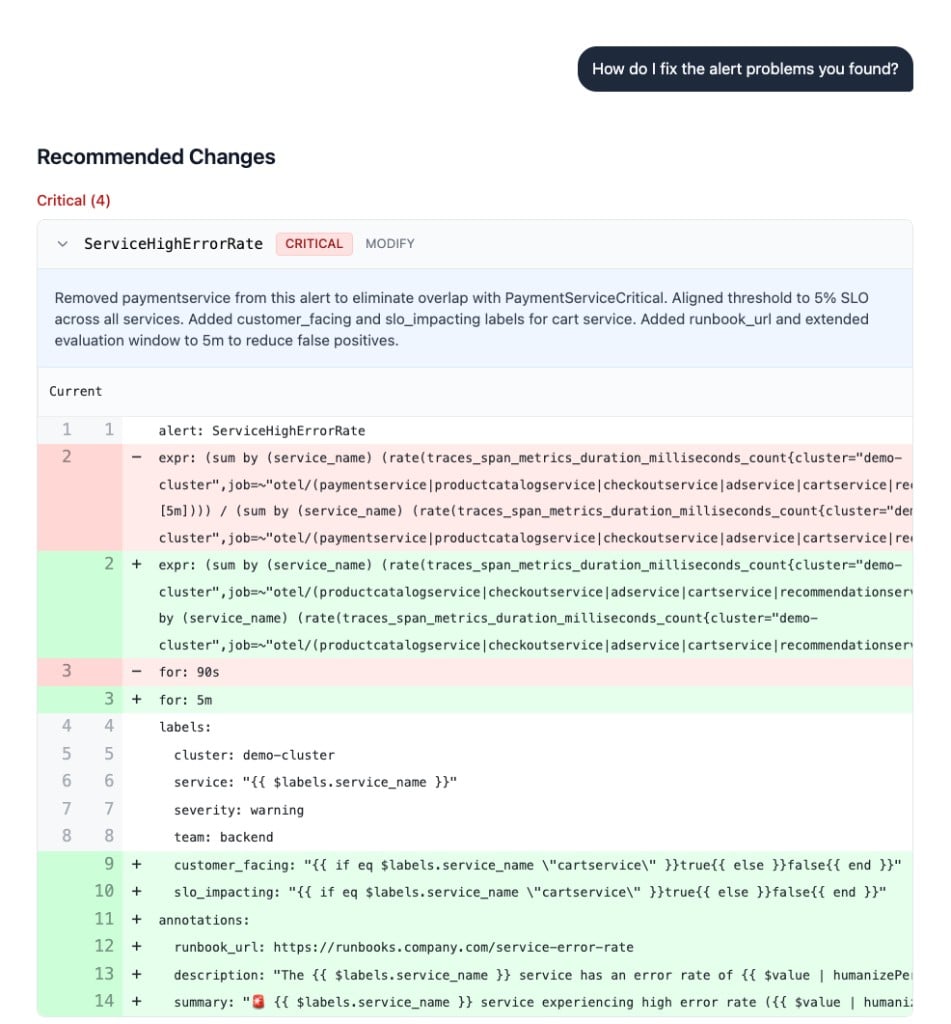
Ask NOFire to fix the problems it found, and it generates concrete rule changes with a diff view, showing exactly what to modify in your alert configuration.
### How to use it
```
@NOFire AI review our alerting rules — what's noisy and what's missing?
```
```
@NOFire AI which alerts have fired the most this month and are they useful?
```
```
@NOFire AI are there services with no alerts configured?
```
```
@NOFire AI suggest better thresholds for our latency alerts based on actual traffic
```
Ask NOFire to fix the problems it found, and it generates concrete rule changes with a diff view, showing exactly what to modify in your alert configuration.
 ### What gets reviewed
* **Noisy alerts**: rules that fire frequently without leading to action
* **Missing coverage**: services or failure modes with no alerts at all
* **Stale thresholds**: thresholds that haven't been updated as traffic or infrastructure changed
* **Duplicate alerts**: overlapping rules from different tools that fire for the same condition
* **Suggested fixes**: concrete changes to thresholds, conditions, or grouping
### Common scenarios
```
@NOFire AI which of our alerts are noise? Show me the ones that fire often but never lead to action.
```
NOFire checks alert history and correlates with actual incidents to separate signal from noise.
```
@NOFire AI what alerts should we have for the new recommendation service?
```
NOFire looks at the service's metrics, its dependencies, and the failure patterns of similar services in your cluster. It returns a concrete list of alert rules to configure — with suggested thresholds based on your actual traffic, not arbitrary defaults.
You can also ask it to generate the alert rule definitions directly:
```
@NOFire AI generate Prometheus alert rules for the recommendation service
```
```
@NOFire AI we had an outage on cart — do we have alerts that would have caught it sooner?
```
Reviews your existing rules against the incident timeline and identifies gaps.
***
## Available in
* **Slack**: triage happens automatically in alert channels; audit and follow-ups via `@NOFire AI`
* **Chat dashboard**: [my.nofire.ai](https://my.nofire.ai)
* **IDE (MCP)**: query alert status while coding
## Getting Started
Invite `@NOFire AI` to the Slack channel where your alerts land. [See Slack setup →](/slack/installation)
Configure Grafana IRM or Slack trigger routing so alerts reach NOFire. [See trigger setup →](/triggers/grafana-irm)
Once you have alert history flowing, ask NOFire to review your rules and suggest improvements.
Go deeper into why an incident happened
Set up the NOFire AI Slack app
### What gets reviewed
* **Noisy alerts**: rules that fire frequently without leading to action
* **Missing coverage**: services or failure modes with no alerts at all
* **Stale thresholds**: thresholds that haven't been updated as traffic or infrastructure changed
* **Duplicate alerts**: overlapping rules from different tools that fire for the same condition
* **Suggested fixes**: concrete changes to thresholds, conditions, or grouping
### Common scenarios
```
@NOFire AI which of our alerts are noise? Show me the ones that fire often but never lead to action.
```
NOFire checks alert history and correlates with actual incidents to separate signal from noise.
```
@NOFire AI what alerts should we have for the new recommendation service?
```
NOFire looks at the service's metrics, its dependencies, and the failure patterns of similar services in your cluster. It returns a concrete list of alert rules to configure — with suggested thresholds based on your actual traffic, not arbitrary defaults.
You can also ask it to generate the alert rule definitions directly:
```
@NOFire AI generate Prometheus alert rules for the recommendation service
```
```
@NOFire AI we had an outage on cart — do we have alerts that would have caught it sooner?
```
Reviews your existing rules against the incident timeline and identifies gaps.
***
## Available in
* **Slack**: triage happens automatically in alert channels; audit and follow-ups via `@NOFire AI`
* **Chat dashboard**: [my.nofire.ai](https://my.nofire.ai)
* **IDE (MCP)**: query alert status while coding
## Getting Started
Invite `@NOFire AI` to the Slack channel where your alerts land. [See Slack setup →](/slack/installation)
Configure Grafana IRM or Slack trigger routing so alerts reach NOFire. [See trigger setup →](/triggers/grafana-irm)
Once you have alert history flowing, ask NOFire to review your rules and suggest improvements.
Go deeper into why an incident happened
Set up the NOFire AI Slack app