

NOFire AI supports both AWS OpenSearch Service and self-hosted OpenSearch instances using JWT bearer token authentication for secure, standardized access.
Prerequisites
Before you connect OpenSearch to NOFire AI, make sure that you have:- An OpenSearch cluster (AWS OpenSearch Service version 2.11+ or self-hosted)
- Network access to your OpenSearch endpoint from NOFire AI
- Admin access to configure authentication
- For AWS OpenSearch: Fine-grained access control enabled
Step 1: Configure OpenSearch authentication
Choose the authentication method based on your OpenSearch deployment:Option A: AWS OpenSearch service (JWT authentication - recommended)
AWS OpenSearch Service supports JWT authentication for secure, token-based access. This requires OpenSearch version 2.11 or later with fine-grained access control enabled.1. Generate an RSA key pair
Generate an RSA public/private key pair using OpenSSL:publickey.pem file contains your public key, and privatekey.pem contains the private key for signing JWTs.
You can also use ECDSA encryption. AWS OpenSearch Service supports both RSA and ECDSA asymmetric algorithms. Learn more in the AWS OpenSearch JWT documentation.
2. Update domain access policy
Before you enable JWT authentication, update your domain access policy to allow JWT-authenticated requests:3. Enable JWT authentication
In the AWS Console or using the AWS CLI: Via AWS Console:- Navigate to Amazon OpenSearch Service > Select your domain
- Under Domain configuration, find JWT authentication and authorization for OpenSearch
- Select Enable JWT authentication and authorization
- Upload your
publickey.pemfile or paste its content - (Optional) Configure Subject key (default:
sub) and Roles key (default:roles) - Save the changes
4. Create a JWT token
Generate a JWT token signed with your private key. The token must include:- Subject (
sub): A valid OpenSearch user - Roles (
roles): Array of OpenSearch roles (for example,["readall"])
privatekey.pem, using the RS256 or ES256 algorithm.
5. Note your connection details
You will need:- OpenSearch Endpoint:
https://search-your-domain.region.es.amazonaws.com - JWT Token: The signed token from step 4
Option B: Self-hosted OpenSearch (bearer token authentication)
For self-hosted OpenSearch instances, use JWT bearer token authentication.1. Configure JWT authentication
Edit youropensearch.yml to enable JWT authentication:
2. Create service account or user
Access OpenSearch Dashboards and create an internal user for the token:- Navigate to OpenSearch Dashboards (typically
https://your-opensearch-host:5601) - Go to Security > Internal Users
- Click Create internal user
- Set username:
nofireai-logs-reader - Set as service account with
"service": "true"attribute - Assign the correct roles (for example,
readall)
3. Generate bearer token
Create a JWT token with the correct claims, or use the token from your identity provider. The token must include:- User identity claims: Subject matching the OpenSearch user
- Role/permission information: Roles array with read permissions
For detailed JWT configuration on self-hosted OpenSearch, see the OpenSearch Authentication Tokens documentation.
4. Note your connection details
You will need:- OpenSearch URL:
https://opensearch.mycompany.com:9200 - Bearer Token: Your JWT token
Step 2: Add OpenSearch connection to NOFire AI
-
Go to Connections and click Connect on OpenSearch.
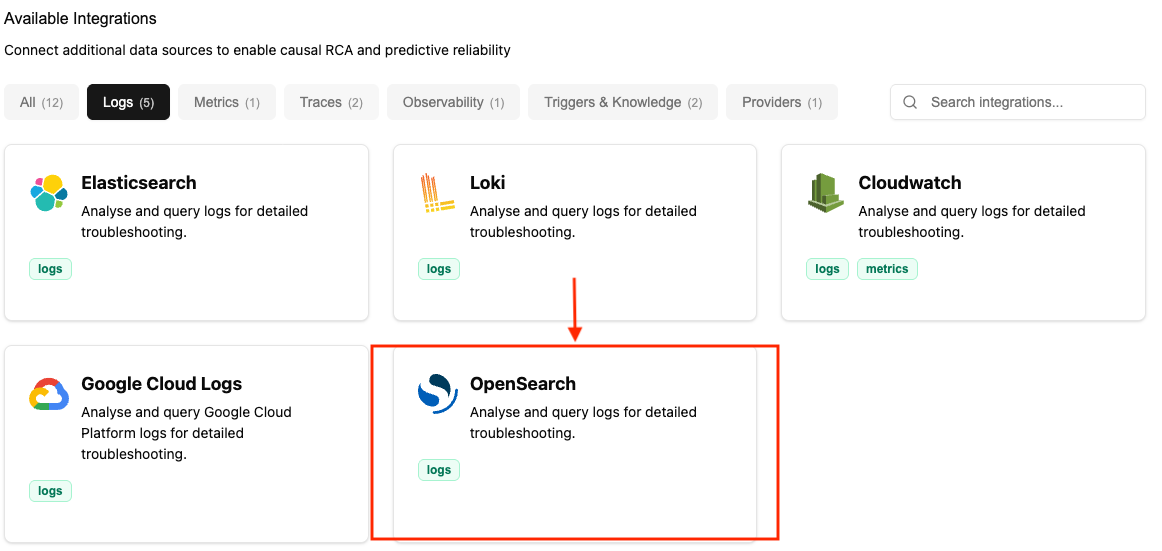
-
Enter Connection Details:
- Name: Enter a descriptive name (for example, “production-opensearch”)
- URL: Your OpenSearch endpoint
- AWS Example:
https://search-my-domain-abc123.us-east-1.es.amazonaws.com - Self-hosted Example:
https://opensearch.mycompany.com:9200
- AWS Example:
- Token: The JWT token that you created in Step 1
- For AWS OpenSearch: The JWT token from Option A
- For Self-Hosted: The bearer token from Option B
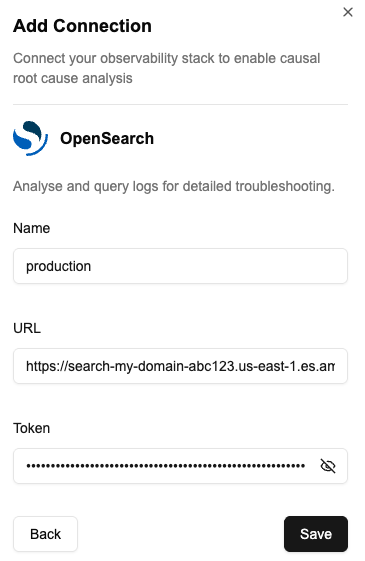
- Save: Click Save. NOFire checks the credentials and creates the connection. After you connect to your log source, NOFire AI queries and analyzes logs on demand as part of its causal root cause analysis. NOFire AI queries logs only when needed to enrich investigations.
Additional resources
Test the connection
- Open the Connections dashboard and make sure that the OpenSearch connection status is READY. A connection that stays in an error state did not authenticate.
- Ask NOFire a question that needs logs, for example “show me the errors for the checkout service in the last hour”. An answer that quotes your log lines confirms the connection works end to end.
Troubleshooting
The connection fails to authenticate
The connection fails to authenticate
The token is expired, or the JWT signing key on the connection does not match the one in the domain security settings.
The connection saves but returns no logs
The connection saves but returns no logs
The mapped role does not cover the indices you query. Open the role mapping in OpenSearch Dashboards and add the index pattern.