

No manual trigger
When enough evidence has accumulated, NOFire begins analysis. No @mention needed.
Full incident context
Every response is grounded in the full channel history, not just the last message
Catch-up for new joiners
When someone joins mid-incident, they get a private summary of what is happened so far
Postmortem on demand
After resolution, ask NOFire to draft the postmortem from the evidence timeline
What NOFire does in an incident channel
Monitoring Recognizes your incident channels by naming convention Set one or more channel prefixes in Settings (e.g.inc-, sev1-, incident-). Any channel matching that prefix that NOFire is invited to is treated as an incident channel automatically.
Builds an evidence timeline
As messages appear, NOFire reads and classifies them: a finding? A hypothesis? An impact update? A resolution? It maintains this evidence timeline continuously as the incident evolves.
Acting
Begins reasoning when signals accumulate
Once enough evidence has accumulated, NOFire begins analysis and posts an update to the channel. You can configure the evidence threshold. See analysis trigger below.
Answers @mentions with the full incident context
After analysis begins, any @NOFire AI mention in the channel gets a response grounded in everything: prior messages, findings, evidence, and the analysis itself. Ask it to check logs, inspect a deployment, explain a metric, or summarize the current state.
Supporting
Sends private catch-up summaries to new joiners
When someone joins the channel mid-incident, NOFire sends them a private message summarizing what has happened so far. New joiners do not have to scroll back through hundreds of messages.
Drafts the postmortem
When the incident is resolved, ask NOFire to write the postmortem. It drafts it from the full channel history and evidence timeline, covering timeline, root cause, impact, findings, and next steps.
Getting started
Prerequisites- The NOFire Slack App is installed in your workspace (Installation guide)
- You have Admin access to NOFire settings
1
Set your incident channel prefixes
Go to Settings → Slack → Incident Channels and add the channel name prefixes your team uses for incidents.Common examples: 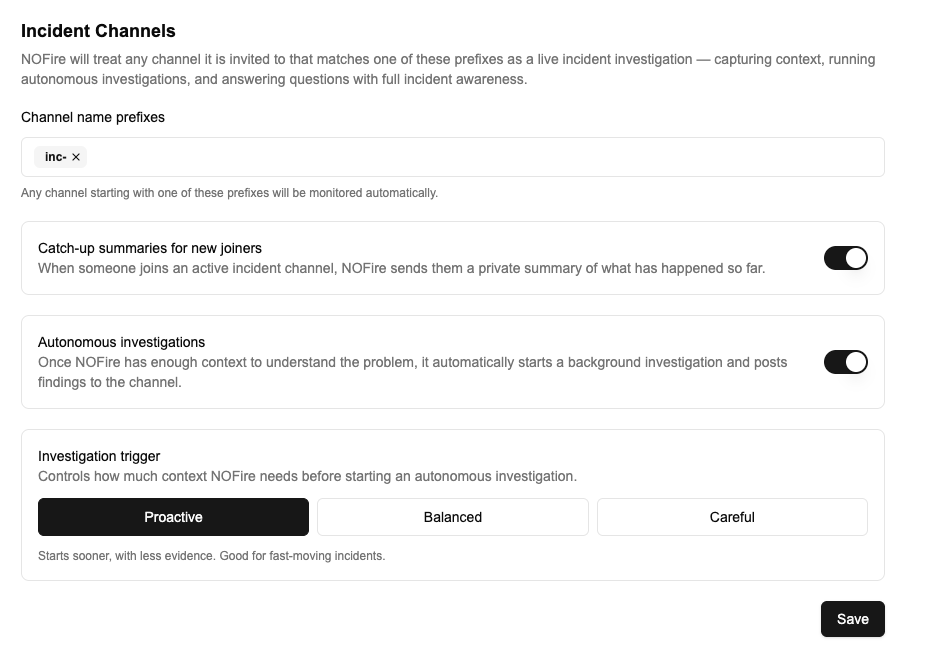
inc-, incident-, sev1-, sev2-, outage-Any channel matching a prefix that NOFire is invited to will be treated as an incident channel automatically.2
Configure channel behavior
On the same settings page you can toggle Catch-up summaries and Incident channel analysis on or off, and set the Analysis trigger sensitivity. See analysis trigger below for guidance on which to choose.
3
Invite NOFire to your next incident channel
When an incident is declared and the channel is created, invite
@NOFire AI. It will announce itself and begin monitoring immediately.If you use an incident management tool to create channels automatically, invite NOFire as part of that workflow so it is always present from the start.During an incident
Once NOFire is in the channel:- It reads messages in the background as evidence builds up
- When enough signals have accumulated, it posts “Investigation started” and begins the full analysis
- Responders can @mention it at any point to ask questions
Catch-up summaries
When someone joins mid-incident, NOFire sends them a private message covering what has happened so far: the symptoms reported, findings so far, current status, and any key decisions made. Only they can see it. Enabled by default. To disable, go to Settings → Slack → Incident Channels and toggle off Catch-up summaries.Postmortem
When the incident is resolved, ask NOFire to write the postmortem:Analysis trigger
Control how quickly NOFire begins analysis. Configurable per workspace in Settings → Slack → Incident Channels.Access & privacy
- NOFire only reads messages in channels it has been explicitly invited to
- Catch-up summaries are ephemeral and visible only to the person who joined, not to the channel
- Incident channel analysis can be disabled per workspace in Settings → Slack → Incident Channels
Next steps
Knowledge
Add context about your environment so evidence analysis is more accurate from the start
Install the Slack app
Set up the NOFire Slack app in your workspace